Missing something?
Add it.
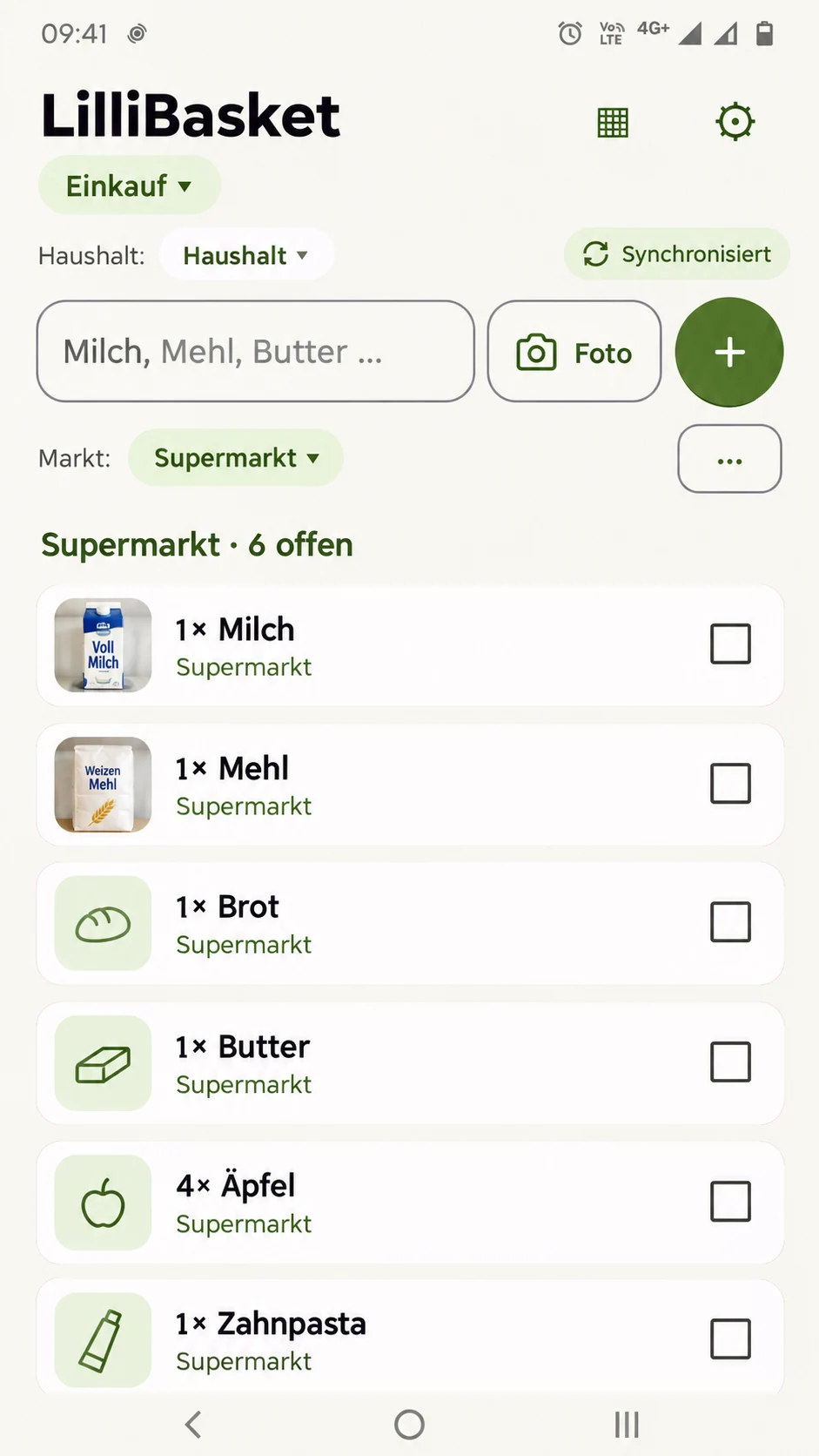
Milk, flour or toothpaste: add it quickly and you are done. The list stays where it belongs, with you and your household.
LilliBasket organizes shopping for you and your household with shared lists, quick entry, barcode scanning, a receipt archive and synchronization.
What makes LilliBasket different: Your shopping list should help you, not sell to you. That is why your list has no paid product placements or sponsored retailer recommendations.
Coming to Google Play · Not publicly available yet
You think of something at home, then remember something else on the go. LilliBasket keeps it all in one place so you can follow your shared shopping plans.
Milk, flour or toothpaste: add it quickly and you are done. The list stays where it belongs, with you and your household.
Shared lists update for the whole household. What is added at home is visible while you are out.
Birthdays, holidays, weekends or everyday shopping: separate lists keep different occasions organized.
One household, several people, the same current list. No complicated setup or constant checking with each other.
Point the camera at a barcode, identify the product and add it. Ideal for things you buy regularly, without typing the name again. With Plus, the same scanner also recognizes receipts and saves them to the receipt archive.
When available, you can also add an item through Telegram. A message such as #groceries Milk puts “Milk” on the right list.
The LilliBasket principle
Nobody can buy their way onto your shopping list.
Technical services such as cloud hosting, billing or advertising in the free plan may process data. The privacy policy explains which data is needed and why.
With Plus: scan barcodes, archive receipts and compare them.
Products you use repeatedly stay easy to find.
With Plus, you can take and view product photos. Cloud storage is a separate option.
Telegram and email input are planned ways to add items from outside the app.
Shop together with Free. Plus covers your household. Personal Cloud stores your photos.
Always free
Everything you need for shared shopping lists.
Annual subscription per household
One subscription benefits every household member.
Annual subscription per account
Keep photos from your households in personal storage and free up phone space.
Plus and Cloud are separate annual subscriptions. Local product photos remain for up to six calendar months after Plus ends. The offer in your Play account applies. IP Geolocation by DB-IP
Add what is missing. Check off what is in the basket. See together what your household still needs.
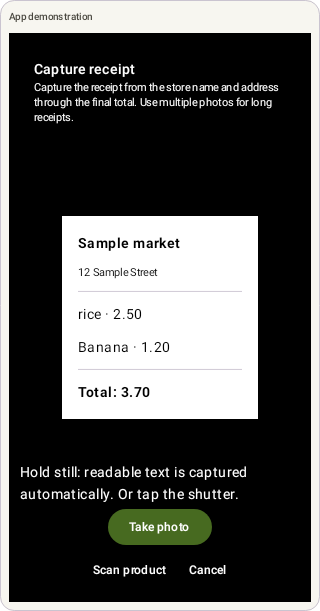
With Plus, from app version 0.7.0-vps: the scanner automatically recognizes typical receipts. Capture the store name and address through the final total. The camera takes a photo when readable text stays still; you can also use the shutter or correct the mode.
Capture long receipts in several photos. A downward arrow guides you to the next section. Overlap a few lines, check each photo and add more sections as needed. A detected total suggests finishing; it does not stop you adding sections.
Find Receipt archive in Settings directly above App Language. Check the suggested store, date and total before saving. Receipts remain local to this device, separated by account and household; there is no cloud backup for them.
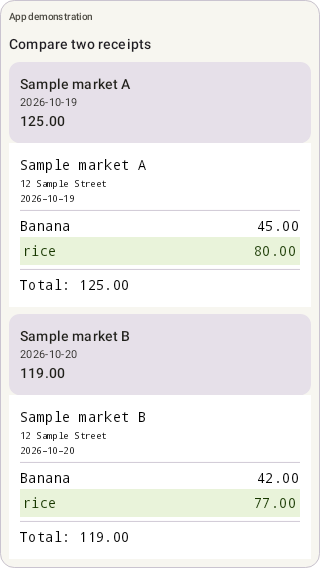
Select two receipts for a manual price comparison. Portrait places them above and below; landscape places them side by side. Switch layouts and zoom or pan each receipt independently.
Bea explains capture, the archive and comparison. Her introduction now walks through the app in 18 steps. Try asking: “How do I compare two receipts?”


Plus lets you capture and save new receipts and compare two receipts. After Plus ends, Free still lets you view and delete previously saved receipts individually. One Plus subscription covers every member of your household. The receipt archive stays local to this device.
Usually not: the scanner uses local text recognition to identify typical receipts. If an image is unclear, choose Capture receipt and switch to Scan product if needed. Automatic detection can make mistakes; check the photo.
No. This receipt archive exists only on this device and is separated by account and household. Other devices do not receive these receipts automatically. Losing the device, uninstalling the app or clearing its data can remove them.
No. You compare the receipt images yourself. Store, date and total are suggested for review; individual item prices are not compared automatically.
Yes. Unlimited households and lists, shared lists and sync, and product memory are free. Free may display ads; Plus removes them and adds barcode scanning, receipts and product photos.
No. One annual Plus subscription covers the shared household, so its members benefit without a separate per-person charge.
Yes. LilliBasket is designed for shared households and synchronized shopping lists.
No. Retailers and brands cannot buy a preferred position in your shopping list.
Choose Cloud200 or Cloud500 as an optional annual subscription per account for up to 200 or 500 photos across your households. Plus is required to take and view photos. Personal Cloud storage continues independently of Plus.
Sign in on the new phone with the same account. Lists, items and household data that have already synced will load again. Let any pending changes on the old phone sync first. Photos stored only on the old phone do not move just by signing in; keep that phone until you have secured the photos and checked them on the new one.
Personal Cloud storage for photos across your households is a regular yearly subscription; there is no one-time purchase for a phone move. Choose a quota that fits, offload the photos you want from the old phone yourself, and check that the transfer has finished. On the new phone, you can use them with the same account and the required photo rights, or retrieve them onto the device. If you cancel, explicitly choose and confirm retrieval to this phone, then check that all photos are stored there. Cancelling alone does not automatically move photos back.
Plan together, scan, compare receipts, add items through Telegram and shop simply, with no paid product placements in your list.